
Monitor and Control Adobe InDesign Server Instances
The Mediawide Renderer Manager is a monitoring and control platform for teams that depend on Adobe InDesign Server to produce pages, books, ads, and catalogs at volume. It watches every rendering process across every machine, restarts what fails before anyone notices, and gives your team one screen to see the health of the whole operation – plus an API to plug that intelligence into the rest of your pipeline.
The problem it solves
Automated InDesign rendering is powerful, but it is also fragile at scale. A single InDesign Server process can hang, crash, or quietly stop responding – and when it does, jobs back up, deadlines slip, and someone has to notice, log in, and fix it manually. The more renderer instances and machines you run, the more of this babysitting adds up, and the harder it becomes to answer a simple question: is everything actually working right now?
Mediawide Renderer Manager takes that babysitting off your plate.
What it does
Watches every renderer, everywhere
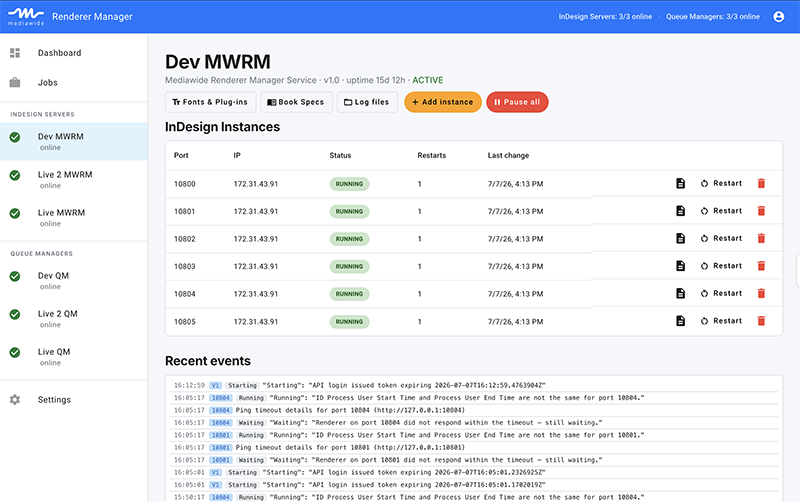
A lightweight service runs alongside your InDesign Server instances, checking their health continuously. When a process crashes, hangs, or stops responding, it restarts it automatically – no ticket, no phone call, no manual intervention.
Gives you one dashboard for the whole fleet
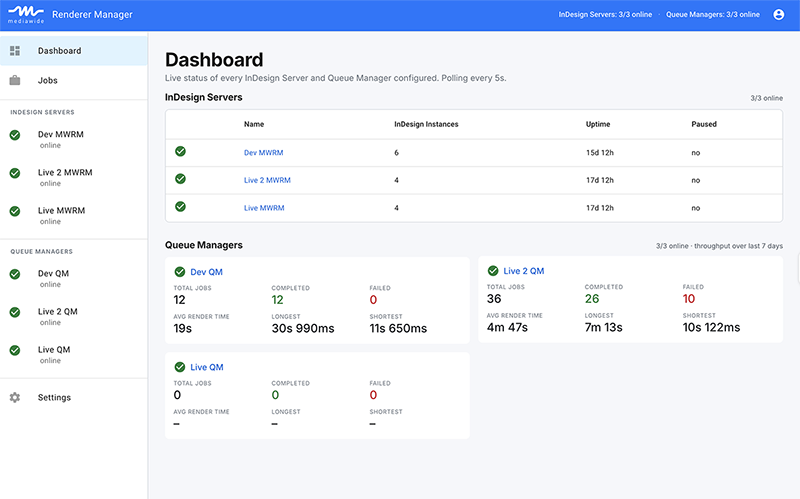
The web dashboard shows every server you manage in one place: which renderers are up, how long they’ve been running, how many times they’ve restarted, and whether anything needs attention. A problem on one machine is visible immediately, instead of surfacing three hours later as a missed deadline.
Connects rendering to the jobs it’s producing
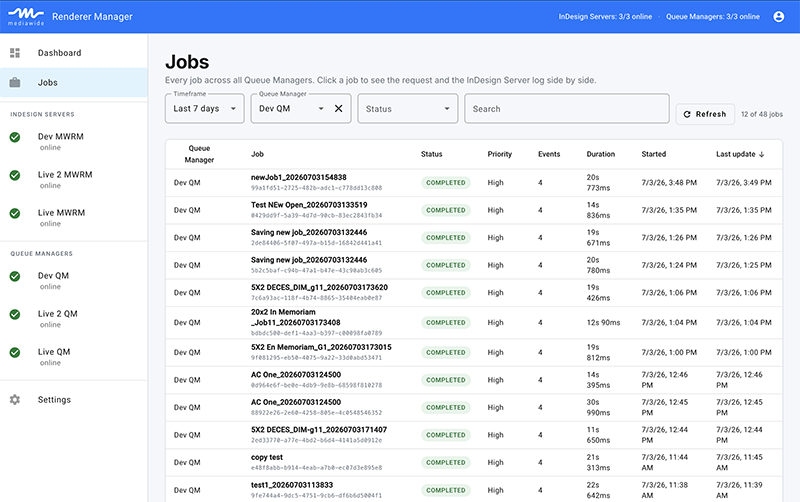
For teams running the Mediawide production job queue, Renderer Manager links up with the queue data to show throughput, completion rates, and failure trends over time – today, this week, this quarter – so you can see not just “is it running” but “is it keeping up.”
Manages the details that cause outages
Fonts and plug-ins are common, quiet sources of rendering failures. Renderer Manager gives your team a controlled way to upload, review, and remove fonts and plug-in files directly from the dashboard, without remote desktops or file shares.
Puts guardrails around who can do what
Role-based access (RBAC) means operators can watch and troubleshoot, power users can restart and reconfigure renderers day to day, and administrators keep control over the servers, connections, and people who have access – all from the same interface.
Built to fit into your systems, not replace them
Mediawide Renderer Manager isn’t a closed box. Every capability in the dashboard – server health, renderer status, job history, controls – is backed by a secured API, so the same information and actions are available to your own tools, not just to a person looking at a screen.
That means you can:
- Feed renderer and job health into your existing monitoring or alerting stack
- Trigger restarts, add capacity, or pull status as part of your own automation
- Build custom reporting on top of live production data instead of exporting it by hand
The API is authenticated end-to-end, so integrating it into your environment doesn’t mean opening up your rendering infrastructure to anyone who finds the URL.
Secure by design
Production rendering infrastructure is not something to expose casually. Renderer Manager is built with that assumption from the ground up:
- Every request to a Renderer Manager instance is authenticated and signed — the dashboard, and any system integrating through the API, must prove they’re allowed to be there
- Credentials and connection secrets are encrypted at rest, never stored or transmitted in the clear
- Access is role-based, so day-to-day operators simply don’t see the controls that could take down production
- User sessions expire automatically, and accounts, roles, and access can be managed centrally by an administrator
- Capabilities to control access through your existing ODIC or SAML authentication platform (OTKA, Azure AD, etc)
Deploys where you need it
The renderer-supervision service runs alongside InDesign Server on Windows, wherever your rendering infrastructure already lives. The web dashboard is a modern, containerized application that runs equally well on a single server or in a Kubernetes cluster – so it fits whether you’re managing a handful of renderers in one office or a distributed fleet across multiple sites.
Who it’s for
Mediawide Renderer Manager is built for production and IT operations teams responsible for keeping high-volume, automated InDesign rendering running reliably – publishing operations, print service providers, and any team where “the renderers are down” is a sentence that costs real money the longer it goes unnoticed.