
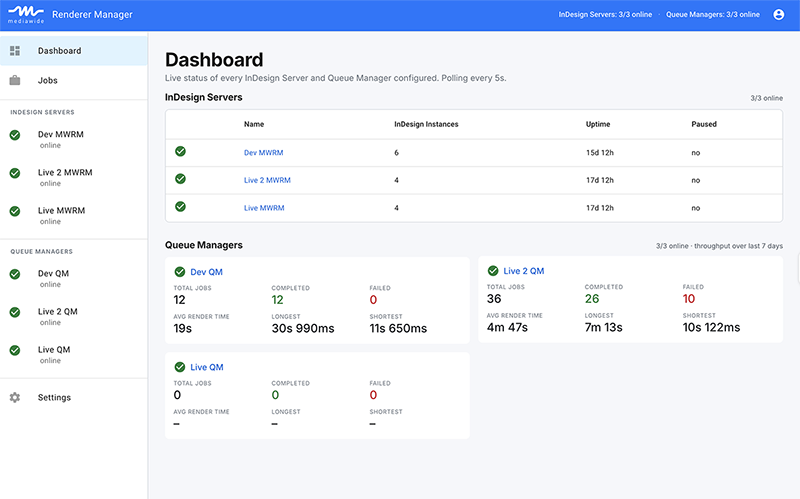
Before Mediawide Renderer Manager was a product, it was an internal problem. Our platforms produce pages, books, ads, and catalogs at a volume that depends on Adobe InDesign Server running cleanly, around the clock, across a growing number of machines – and for a long time, keeping that fleet healthy meant someone on the team quietly watching for trouble.
The failure pattern was always the same. A renderer would hang or crash, nothing would alert anyone, and the first sign of a problem was a job running late. The fix itself was usually trivial – restart the process – but knowing it needed a restart, and knowing it fast enough to matter, was the hard part.
What we tried first
Like most teams in this position, we started with scripts: scheduled tasks that checked whether a process was alive and restarted it if not. It worked, until it didn’t. Scripts don’t tell you why something failed, don’t distinguish between a renderer that’s crashed once and one that’s crashed six times today, and don’t give anyone outside the room a way to see what’s actually happening. As the number of renderers grew, so did the blind spots.
What we built instead
We built a proper supervision layer: a service that watches every InDesign Server process continuously, restarts what fails automatically, and reports its status through an API instead of a log file someone has to remember to check. On top of that, we built a dashboard, so anyone on the team – not just whoever wrote the original scripts – could see the health of the whole fleet in one screen, drill into a single renderer’s history, and act on it without a remote desktop session.
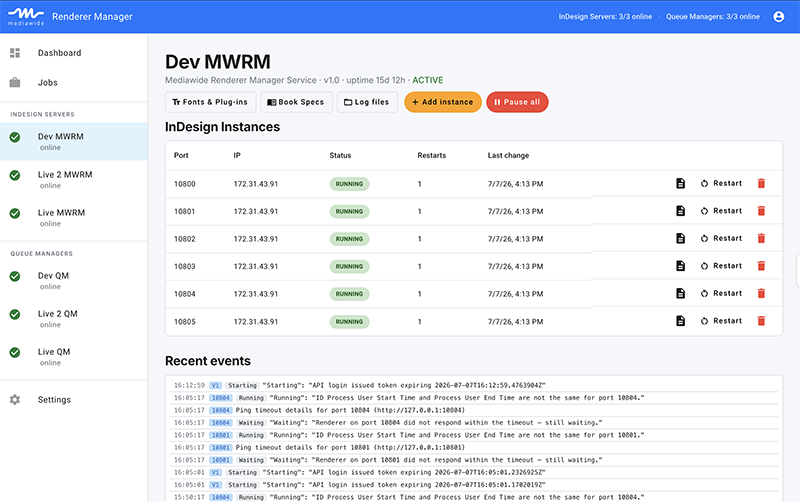
Why we decided to share it
The more we talked to other teams running InDesign Server at scale – print service providers, publishers, in-house production departments – the more we heard the same story back: renderers failing quietly, restarts done by hand, no single view across machines. It’s not a Mediawide-specific problem, it’s an InDesign-at-scale problem, and we’d already solved it for ourselves.
That’s why Mediawide Renderer Manager is now available as its own product: the same monitoring, control, and API layer that keeps our own production infrastructure running, built to fit into your environment instead of just ours.
If renderer downtime is a familiar problem – the kind that’s invisible until it’s already cost you a deadline – we’d like to show you how we solved it – fill in the form below, and we will get back to you.


Leave a Reply